TABLE OF CONTENTS
- Five quick wins
- Writing your description
- Field by field
- Getting started
- Before you publish
- Related Articles
Use this guide to set up your program listing or improve the one you have.
- Ensure the 5 quick wins are complete, as that is the minimum we need to publish your listing.
- Work through the field-by-field section. It follows the listing form in order.
Five quick wins
These make the biggest difference to how your program looks and how easily people find it.
1. Make your title clear at a glance
Use your program's name and make it obvious what it is.
- Include the type, length, and location where you can
- Avoid all caps, extra punctuation, or stuffed keywords. Those go in the SEO fields
Example: "7-Day Yoga and Meditation Retreat in Bali"
2. Lead with a real photo of your program
Your cover image appears in search results. Pick the one that best shows what it feels like to attend, often a group session in progress or a striking shot of the setting.
- Use real photos from past programs where you can. Stock images make it harder for seekers to trust what they'll get.
3. Write a summary that says what and where
You have 250 characters, and your summary shows in search results.
- Say what the program is, where it is, and who it's for
- Include "[retreat type] in [city]," like "yoga retreat in Bali"
- Skip the welcome line and get straight to the point
Example: "A 7-day yoga and meditation retreat in Hood River, Oregon, with daily practice, vegetarian meals, and guided forest hikes. Suitable for all levels."
4. Keep your dates current
Seekers often search by when they're free.
- List exact start and end dates
- Update or remove past dates, so nobody lands on a program that's already happened
5. Link your ticket URL to your booking page
Point it straight to the page where people can book or register, not your homepage. If people have to hunt for the booking page, many won't bother.
Writing your description
This is where you explain exactly what participants will experience. Seekers comparing programs want details, not general promises. Fill in what applies and skip what doesn't.
Formatting tips:

• Use H2 headers for main sections and H3 for subsections
• Word headers clearly, since search engines use them to understand your content
• Put your location in one header, like "Yoga Retreat in Bali"
• Pasting from Word? Select this option to keep your formatting clean:
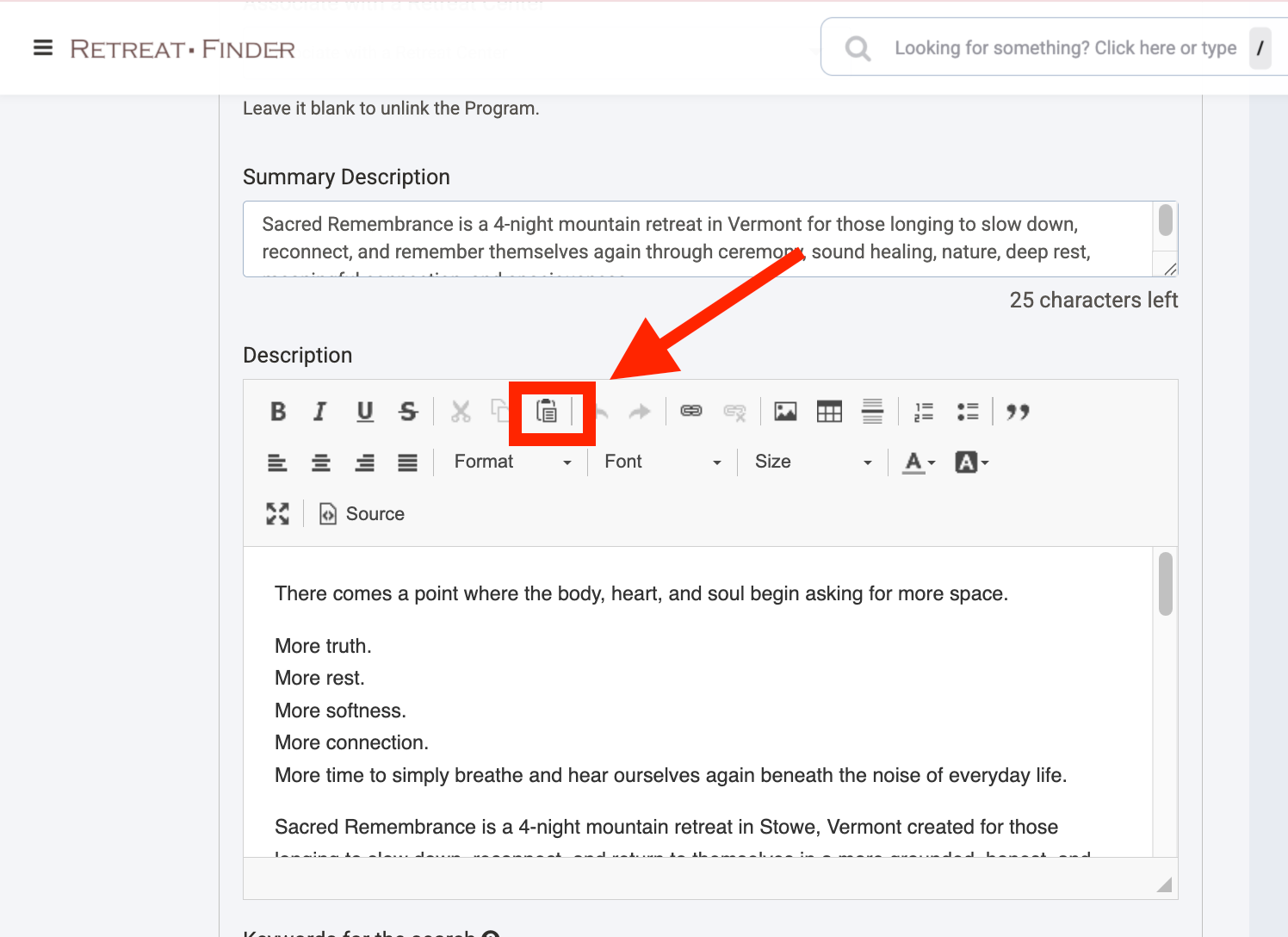
Core sections
Start with these.
Optional sections
Add any that apply.
TIP: Write each FAQ question the way a guest would type it into a search bar, like "What should I bring to a yoga retreat in Bali?"
If you're running a deal, mention it in your description too, with the deadline and any conditions. See Deals below.
Field by field
This follows the listing form from top to bottom.
Getting started
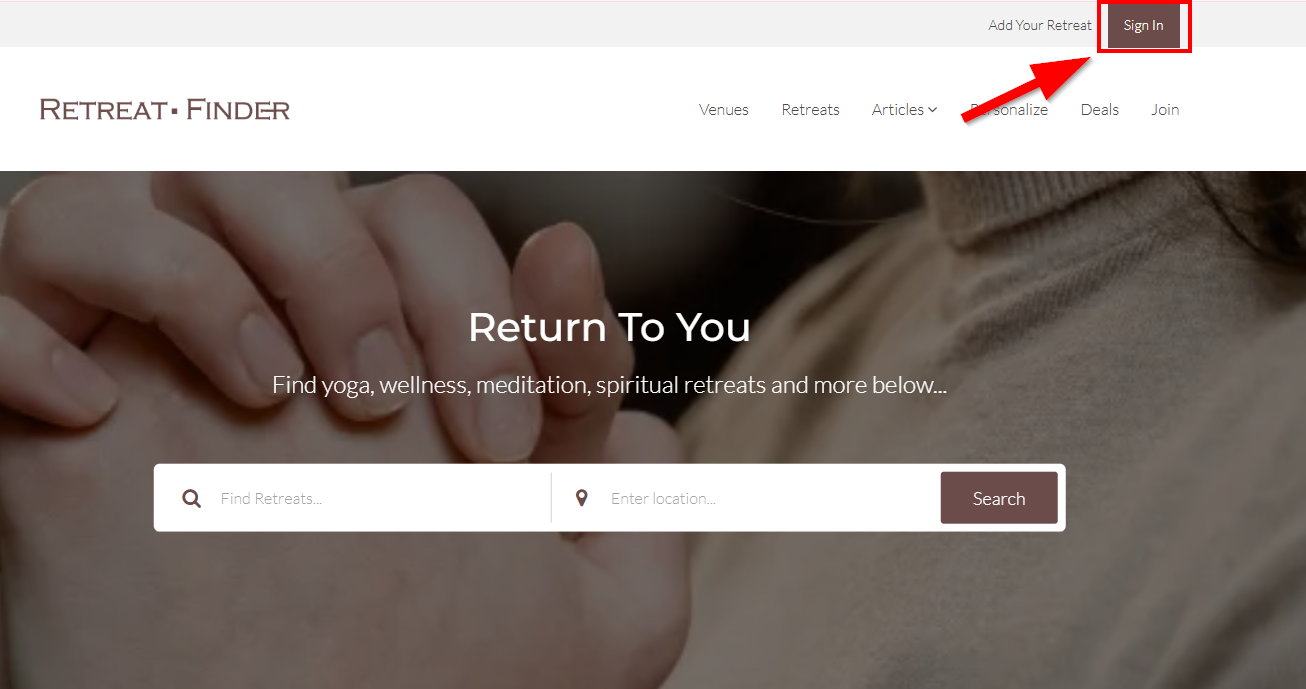
1. Click Sign In on the Retreat Finder homepage.
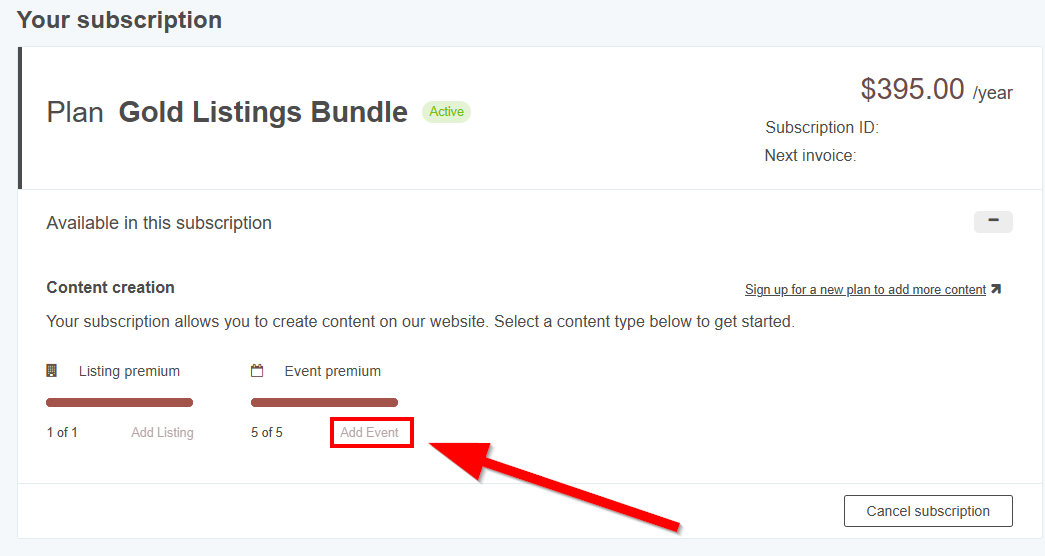
2. Click Add Event under Event Premium
3. Work through the form using this guide.
Program title
See quick win #1.
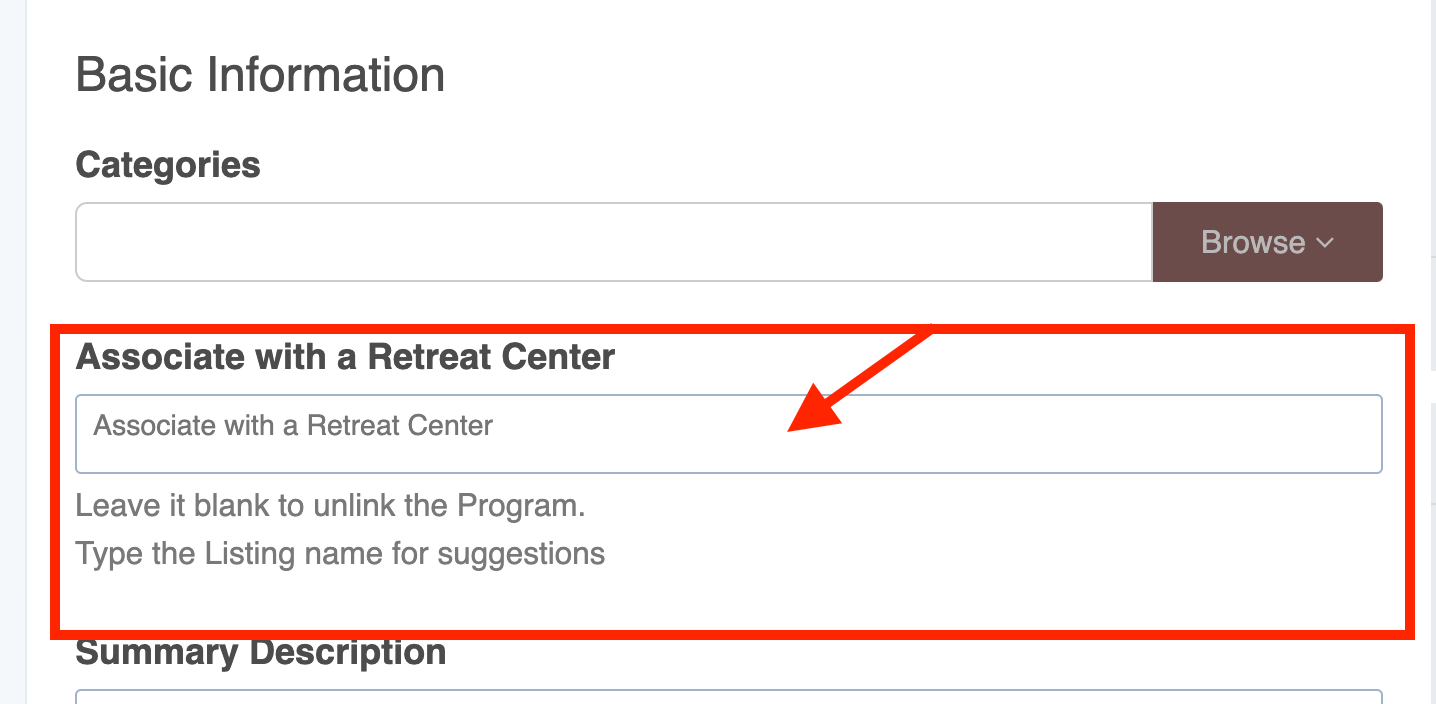
Link to a retreat center
If your program takes place at a r89etreat center, link it to that center's listing. This puts your program in front of seekers already browsing that venue.
- Make sure the retreat center listing exists. If it doesn't, create it first.
- Click Edit on your program
- Under Associate with a Listing, select the retreat center
- Click Save
How to link your program to your retreat center:
Summary description
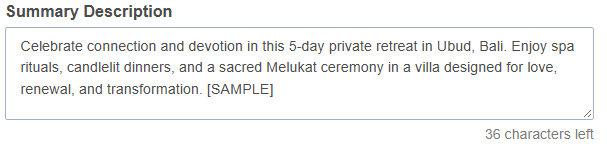
See quick win #3. The SEO description further down is written specifically for Google, so fill in both.
Search keywords (up to 20)

These help your program appear in Retreat Finder's search results.
- Use terms seekers are likely to search, like "yoga retreat," "meditation retreat," or "wellness retreat".
- Only add terms that genuinely describe your program.
Ticket URL

Link to the page where people can book or register for this program, not your homepage.
Contact information
Accurate details make it easy for people to reach you with questions before booking.
Field | Notes |
| Your reservations or sales inbox. Inquiry notifications are sent here. | |
| Website | Your program's sales page |
| Phone | Include your country code. This is shown publicly. |
| Address | Where the program takes place |
Program dates
Clear dates matter, since seekers often search by when they're available.
- Exact start and end dates
- Arrival and departure times, so people can plan their travel
- Time zone, if your audience is international
- For recurring programs, the pattern, like "every first week of the month" or "quarterly: March, June, September, December"
- Update or remove past dates so seekers don't find a program that's already happened
Photo gallery
Spec | Requirement |
| Size | 1024 x 768 px |
| Format | JPG, GIF, or PNG |
| Max file size | 5 MB |
Your cover image appears in search results, so choose the photo that best captures your program. A group session in progress or a striking shot of the setting usually works well.
Aim to cover:
- Sessions in progress: yoga, meditation, workshops, or classes as they actually happen
- Facilitators: so seekers can put a face to who will guide them
- Community moments: shared meals, group circles, people connecting
- The setting: the venue and natural surroundings
- Accommodations: the rooms participants stay in
- Food: the meals included
- Excursions: outings beyond the main sessions
- Past participants: real people enjoying the program, with their permission
TIPS:
• Use real photos from past programs. Stock images make seekers less sure of what they'll get.
• Drag and drop to reorder photos anytime
• Click Save before closing the page
Photo alt text
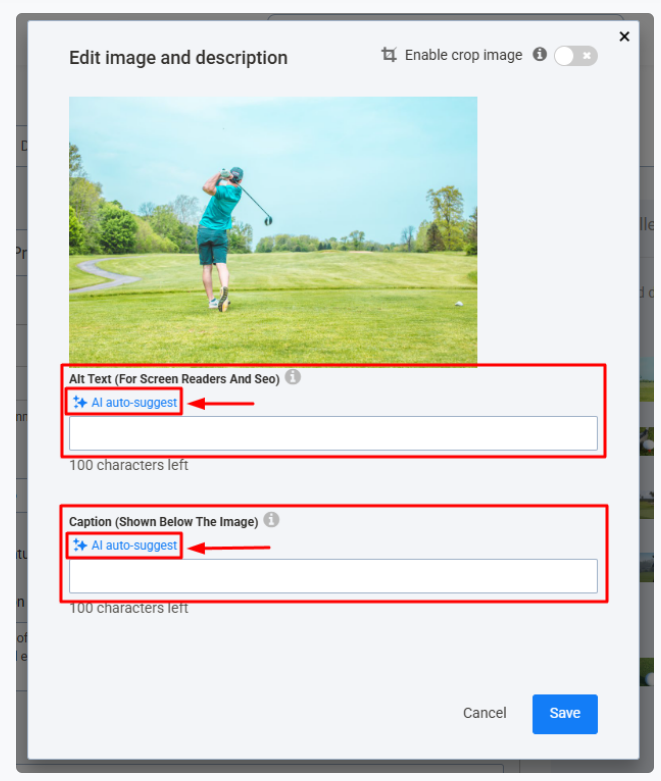
Alt text is a short description of a photo. It helps search engines understand your images and helps guests who use screen readers.
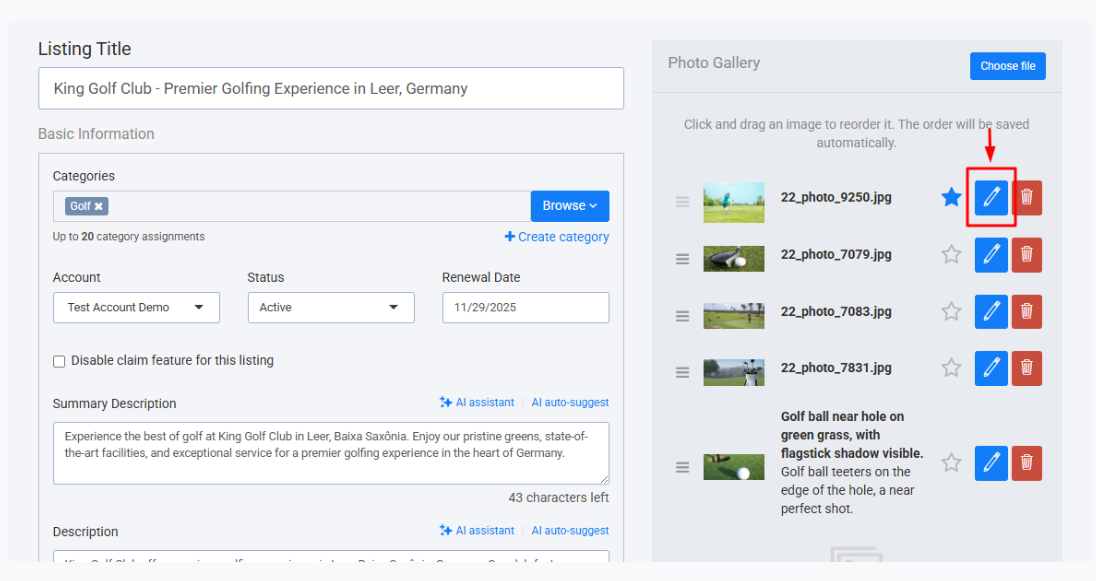
- Click the pencil icon on a photo in your gallery
- In Alt Text (For Screen Readers and SEO), describe what's in the photo
- Keep it under 100 characters, and include your program name or location where it fits
- Click Save
Example: "Group yoga session during a 7-day retreat in Hood River, Oregon"
Only describe what's actually in the photo. Don't add unrelated keywords.
Video
Where your video appears:
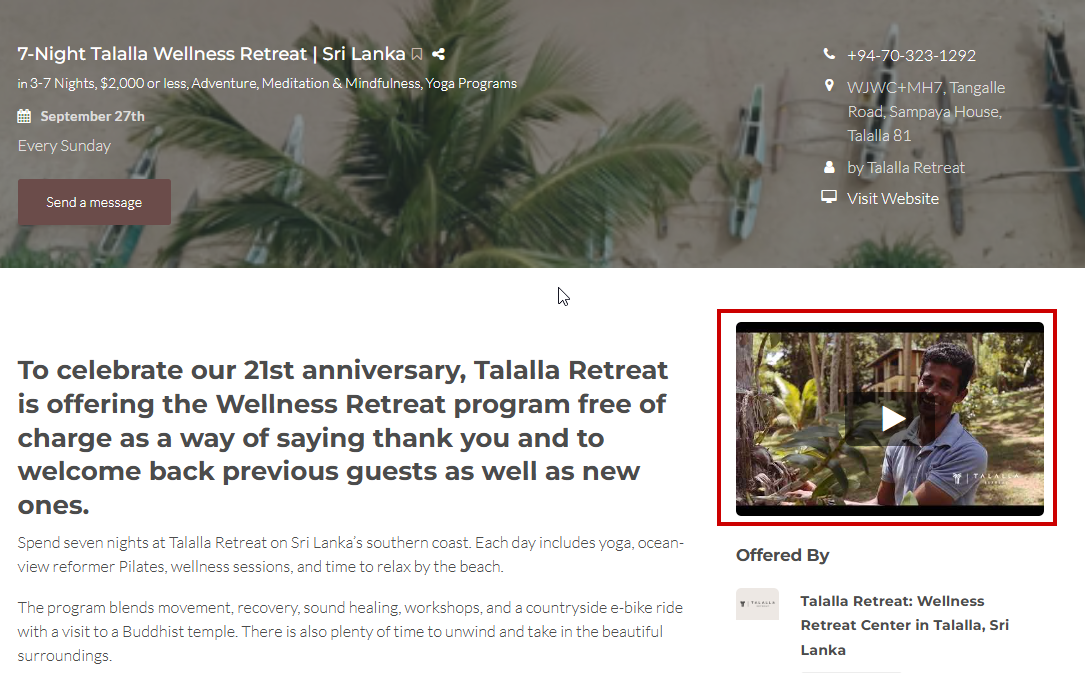
Video builds trust faster than photos. Choose one that shows what the program feels like: the sessions, the setting, and the people leading it.
To add it: open your video on YouTube or Vimeo, click Share, copy the link, and paste it into the video field. For a private Vimeo video, log in first.
Before you add it:
- Check the privacy settings allow it to play on other sites, or it won't show on your listing
- Give it a specific title and description on YouTube or Vimeo, like "7-Day Yoga Retreat in Oregon," so it's easier to find in search
SEO fields
These control how your program appears on Google, separate from Retreat Finder's own search. They help you reach people who aren't browsing Retreat Finder yet.
SEO title: program type, length, and location, with the most important words first.
- 7-Day Yoga and Meditation Retreat | Moonberry Grove, Oregon
URL slug: lowercase words separated by hyphens, with your program type and location.
- 7-day-yoga-meditation-retreat-oregon
SEO keywords: up to 10 phrases people would type into Google, separated by commas.
- yoga retreat Oregon, meditation retreat Oregon, 7-day yoga retreat, beginner yoga retreat
SEO description: what the program is, where it takes place, and who it's for. You have 250 characters, but Google usually shows about 155, so put the key point first. You can check your count at wordcounter.net.
- A 7-day yoga and meditation retreat at Moonberry Grove in Oregon with daily practice, nourishing meals, and guided workshops for all levels.
Deals (optional)
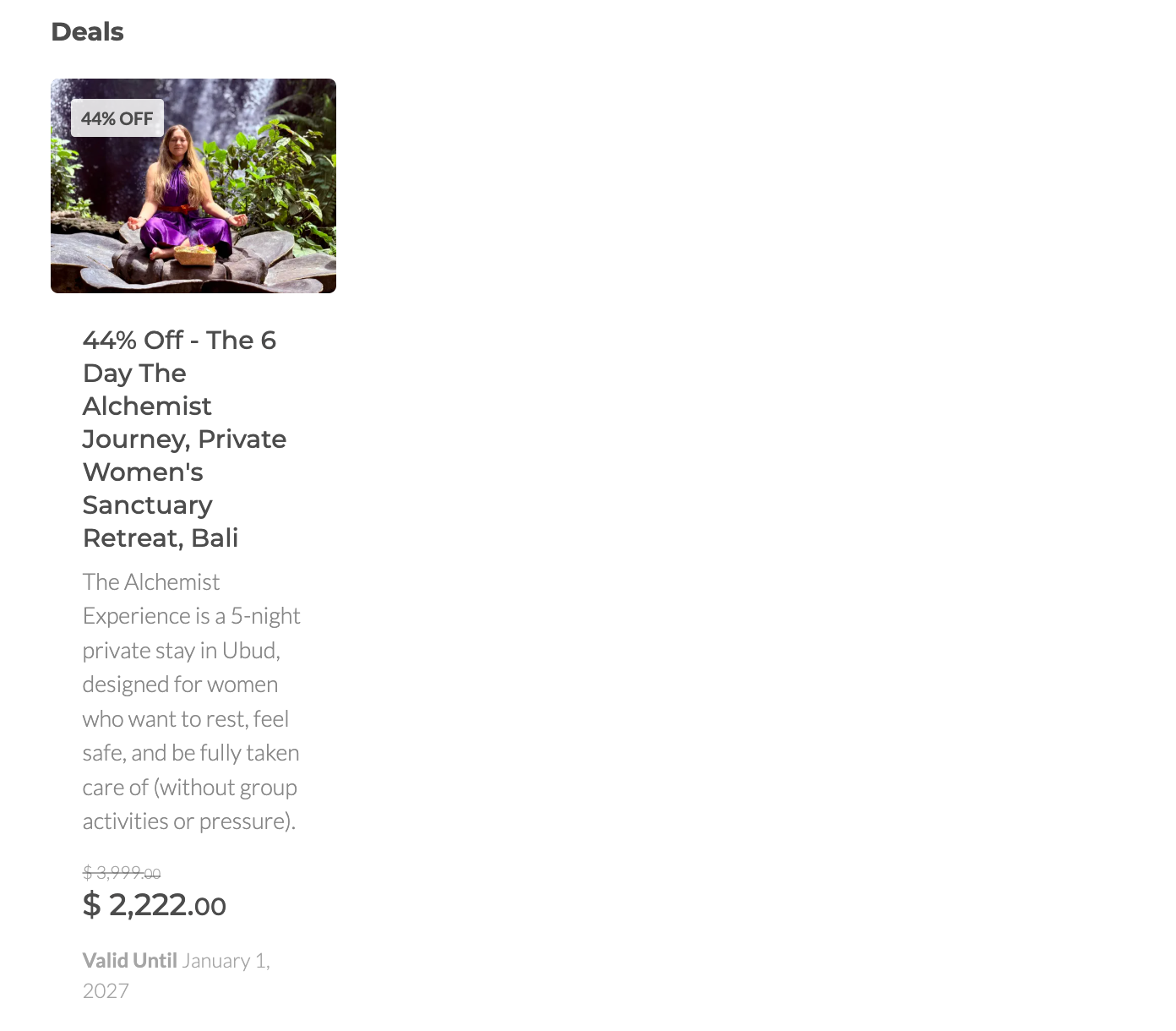
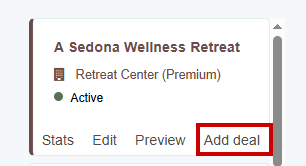
Discounts can help turn interest into bookings. Deals are created under your Retreat Center listing, so seekers can see them at a glance.
Where your deals appear on your listing:
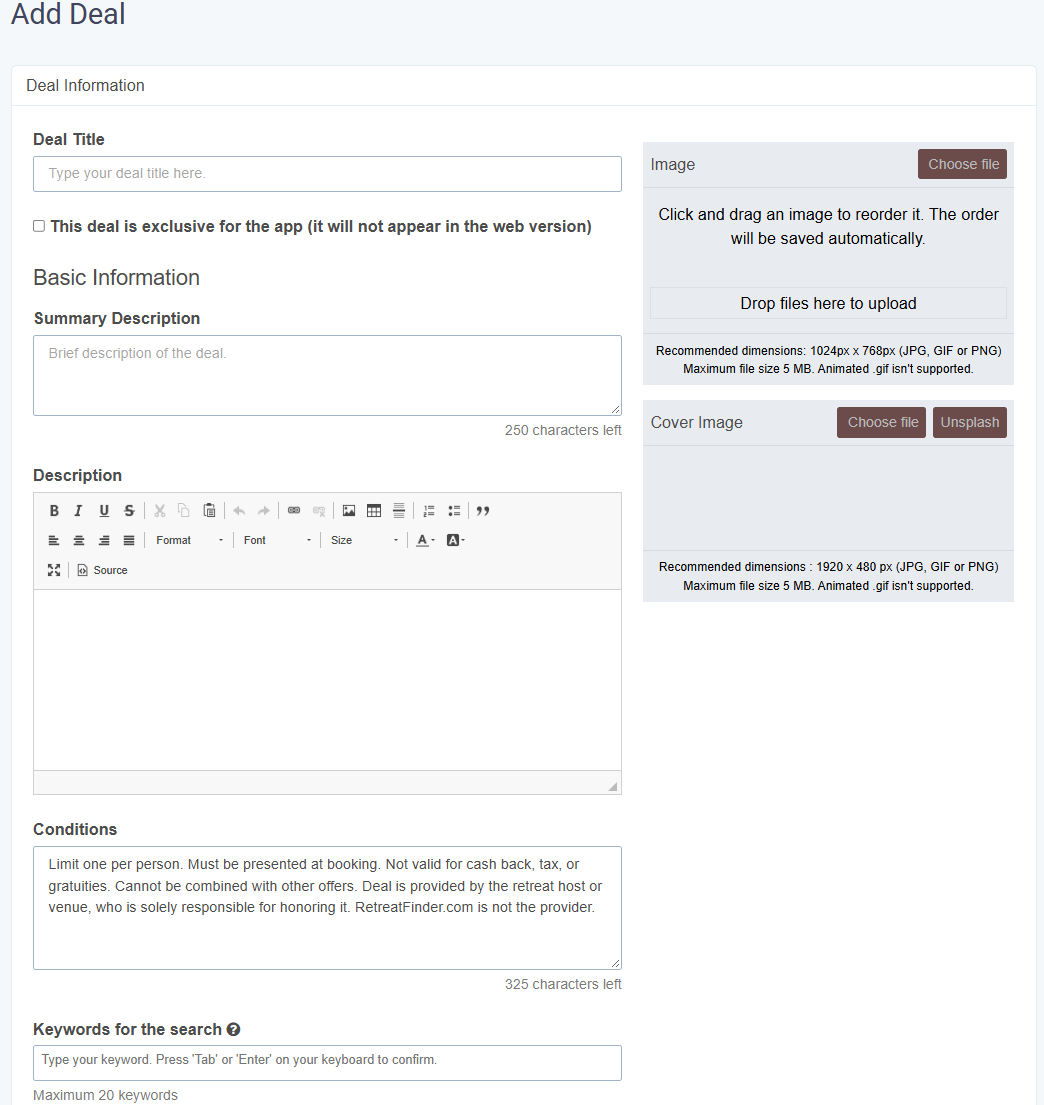
How to add deals:
Ideas to consider:
- Early bird pricing for people who book well ahead
- Group or friends discounts for people booking together
- Returning participant rates
- Promo codes for newsletter subscribers or social followers
What to include in each deal:
| Field | What to write |
| Image | A photo from the program itself, like a session or the setting |
| Description | The exact offer, like "15% off bookings made before March 1" or "Use code SPRING20 for $200 off." Avoid vague wording like "special discount available." |
| Terms and conditions | Any limits, like which programs or room types it covers, minimum group size, or whether it combines with other offers |
| Validity | Start and end dates, so seekers know how long they have |
Mention the deal in your program description too, and remove or update it once it expires. Click Save when you're done.Before you publish
Quick wins
- Title says the program type, length, and location
- Cover image is a real photo that shows what it feels like to attend
- Summary says what the program is, where it is, and who it's for
- Dates are current, with past dates removed
- Ticket URL goes straight to your booking page
Everything else
- Program is linked to its retreat center listing, if it has one
- Description is specific, covers the core sections, and uses H2 and H3 headers
- Inclusions and exclusions are clear
- Arrival and departure times are listed, plus time zone if needed
- Gallery covers sessions, facilitators, setting, rooms, food, and participants
- Every photo has alt text
- Search keywords describe what you actually offer
- Email and phone number (with country code) are correct
- Video plays on your listing
- SEO title, URL, keywords, and description are filled in
- Any deals have clear terms and end dates
Need help with your listing? Contact our team to learn about our done-for-you listing service.
Related Articles
- How to add your listing
- Best practices for your retreat center listing
- How to link your program to your retreat center?
Have more questions? Submit a new ticket.
Was this article helpful?
That’s Great!
Thank you for your feedback
Sorry! We couldn't be helpful
Thank you for your feedback
Feedback sent
We appreciate your effort and will try to fix the article